Crashes mid-job
Whether a failure resumes from where it stopped or restarts from zero, and what state gets lost either way.
AI that works. Even on its worst day.
Most production AI failures come from four places: the agent crashes mid-job and loses its work, a model update changes its answers without warning, it reads stale data, or its cost per run climbs quietly. A reliability audit finds which of these is happening to you, in one to two weeks.

Xillentech engineered specialized Autonomous Agents including Voice Command AI to automate our workflows end-to-end. They transformed complex requirements into predictable, scalable outcomes.


Microsoft Research's Victor Dibia put it plainly: autonomous multi-agent systems are like self-driving cars — proof of concepts are simple, but the last 5% of reliability is as hard as the first 95%. An audit is how you find out which 5% you're missing.
Whether a failure resumes from where it stopped or restarts from zero, and what state gets lost either way.

Whether you'd know if a model update changed your agent's answers, and how long it would take to notice.

Whether the agent is reading live records or a cached copy, and what happens when they disagree.

What a single run costs today, what the worst case costs, and whether anything stops it before the bill arrives.

If any answer is “no” or “not sure,” that's exactly what a reliability audit finds.

If a model update silently changed your agent's answers tomorrow, would you find out within a day — or a customer complaint?
Do you know what your worst-case cost per run actually is, or only the average?
If your agent crashed mid-task right now, would it resume, or would that work simply vanish?
Could you show, after the fact, who or what approved the last irreversible action your agent took?
Ten working days, start to finish, with a fixed scope and fee agreed before we start. We don't read your code and guess what might break — we run the system under forced-failure conditions and catalogue each of the four failure modes above as we find it.
We read the code, map every external dependency, and run the system under forced-failure conditions — killing the process mid-task, feeding it malformed input — to see what actually breaks, not what we assume might.
We catalogue every failure mode found: how often it happens, what triggers it, and what it costs if it keeps happening. Each one is reproduced and written up specifically enough to hand straight to an engineer.
You get a ranked fix-it plan — ordered by cost of inaction, not by what's easiest for us to sell — plus a straight recommendation on whether you need a full Production Hardening build or a lighter fix.

The difference isn't effort — it's whether the fix is based on evidence or a best guess.
| Guessing / DIY debugging | Reliability Audit | |
|---|---|---|
| Method | Read the code, guess what might break | Run the system under forced-failure conditions |
| Evidence | Anecdotal — a developer's best guess | A written, reproducible findings report |
| Fix order | Whatever's easiest to patch first | Ranked by cost of inaction |
| Timeline | Open-ended, often weeks of trial and error | Fixed scope, 1–2 weeks |
| Outcome | A patch, unverified against the other failure modes | A complete deliverable — no obligation to continue |


ScholarMeet.com
Academic Conference Management Platform
“Crawlify powers the data pipeline behind ScholarMeet. We needed to aggregate conference data from hundreds of scattered academic event websites: speaker lists, submission deadlines, topics, venues, and deliver it as a clean, structured feed. What would have taken our team weeks of manual work now runs continuously with verified accuracy.”
Before we audit anyone else's system, we forced the same kind of failure — killing the process mid-run, no warning — on Crawlify, the data-extraction product we built and run ourselves. This is what that kill drill found.

60 of 62
of Crawlify's workflows recovered on their own after we killed the process mid-run

8 of 8
CAPTCHAs Crawlify solved at $0.72 per 1,000 — the kind of failure surface an audit surfaces

$0.0041
what it cost Crawlify to re-run 14 of 41 nodes in a targeted repair instead of the whole job
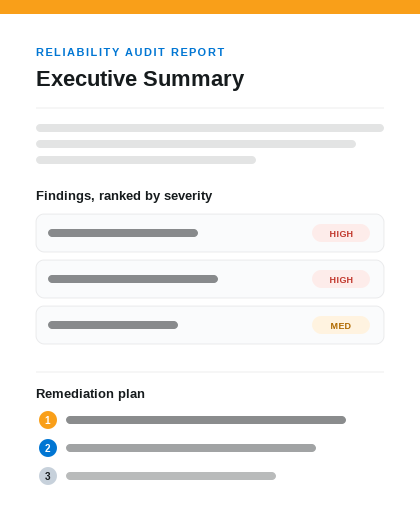
A real written report, not a verbal readout — the same structure penetration-test reports have used for years, adapted to AI agent failures.

The bottom-line a founder can act on — what's broken, how bad, what we recommend — in five seconds, not five meetings.

Every failure mode gets its own row — what it is, how we reproduced it, what it costs if left unfixed.

Fixes ordered by risk and effort, with a straight call on whether it needs full Production Hardening or a lighter fix.

A complete deliverable on its own — nothing here requires you to hire us for what comes next.
| Finding | Severity | If left unfixed |
|---|---|---|
| Crashes mid-job, no resume | High | Every crash loses the work in progress, and the cost repeats on every re-run |
| Silent answer drift after a model update | High | Wrong answers ship until a customer catches it first |
| Stale or wrong data read mid-run | Medium | Decisions get made on records that disagree with the source of truth |
| Cost per run climbing unmonitored | Medium | The bill forces the question before the dashboard does |
Illustrative format — every audit's actual findings, counts, and severities are specific to your system, not filled in from a template.
Cost depends on how many agents you run and how deep the traces need to go. We scope it in a working session before any commitment, and give you a fixed fee before starting. There's no published price because a one-agent Shopify chatbot and a twelve-agent trading system take genuinely different amounts of time to audit properly.

How many agents you run

How deep the traces need to go
Test an AI agent the way production will: by making it fail. Kill it mid-job and check that it resumes (we ran this kill drill on our own pipeline first), rerun its evals after a model update to catch drift, feed it stale or wrong data, and measure its worst-case cost per run rather than the average. Then record which failures it survives and rank the rest by severity. That is what a reliability audit does, in one to two weeks, ending with a findings table ranked by severity and a remediation plan you can act on. Fixes usually follow as production hardening, an AgentOps retainer keeps them in place, and the audit itself is the Map stage of the Production Protocol.
It checks the four places production AI agents actually fail: whether the agent recovers from a crash or loses its work, whether a model update could silently change its behaviour without anyone noticing, whether it's reading live data or something stale, and what it costs per run under real load versus what it costs when something goes wrong. We test each by deliberately trying to break the system rather than reading the code and guessing.
One to two weeks for most systems. The first two or three days are spent reading the code and running it under forced failure conditions. The rest of the time goes into cataloguing what broke, how often, and what it would cost if left unfixed, then ranking the fixes. Systems with many interacting agents or unusually deep integrations run closer to two weeks than one.
A written, ranked list of every failure mode we found, ordered by what it costs you if it keeps happening rather than by what's easiest to fix. You also get a straight recommendation on whether you need a full Production Hardening engagement or whether a smaller fix will do. The audit is a complete deliverable — you're not required to continue into anything else.
Not always. If you already know exactly what's broken, you can go straight to Production Hardening. The audit earns its cost when you're not sure where the failures are, or when you need a written case to bring to a budget conversation before committing to a larger fix. To narrow it down yourself first, match your symptoms to the likely cause.
Yes, and that happens. If the audit finds the system is basically sound and just needs one or two targeted fixes, we say so — the recommendation is whichever path costs you less, including “stop here.”
That's part of what we check. If your agent can take an action a person would need to sign off on, the audit looks at whether that approval is actually recorded anywhere retrievable — not just whether the approval step exists in the code, but whether you could produce evidence of it during an incident review or a compliance question. Most teams that haven't been audited yet can't.
An audit finds what's broken once. If you want that checking to continue automatically, that's what the AgentOps Retainer does.
Tell us what your AI agent does and where you think it's failing. We'll scope the audit in a working session — no commitment beyond that conversation.