Build an AI agent right the first time.
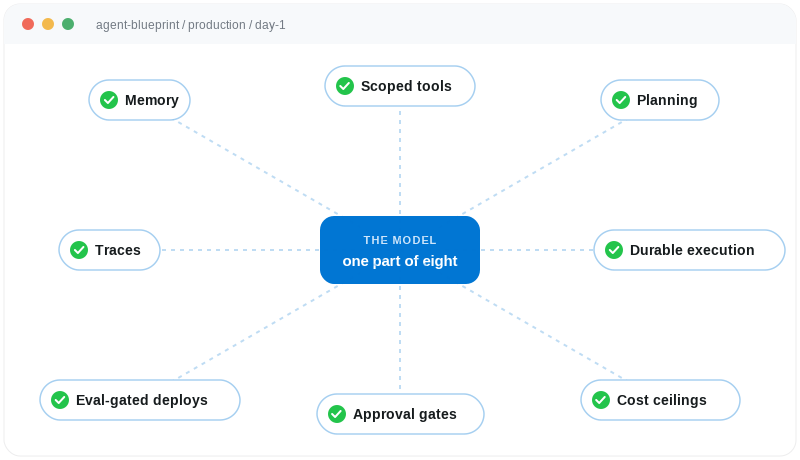
A production AI agent needs more than a model: memory, scoped tools, durable execution so a crash resumes instead of restarting, cost ceilings, approval gates on anything irreversible, and evals that gate every deploy. We build those in from day one, before a first outage can show you what's missing.



Xillentech engineered specialized Autonomous Agents including Voice Command AI to automate our workflows end-to-end. They transformed complex requirements into predictable, scalable outcomes.





Why do AI agents stall between prototype and production?
Getting an agent to work once is the easy part. Gartner predicts that over 40% of agentic AI projects will be canceled by the end of 2027, because of escalating costs, unclear business value, or inadequate risk controls.
Teams that do ship report the same pressure points. In LangChain's State of Agent Engineering survey of 1,340 practitioners, quality was the top barrier to production, and while about 89% had observability in place, only 52% had adopted evals. A study of agents in production by researchers from UC Berkeley, Stanford, IBM Research and others found reliability was the top development challenge.
Look at what those causes have in common: cost, risk controls, quality, reliability. They're decided by what you build around the model, which is where we start.
What does a production agent need besides the model?
Published guides draw the lines differently: Omdena counts ten components, with the model as just one of them. What the guides agree on is that the model is only one part. This is the set we build in from day one.

Memory
What the agent needs to remember across steps and sessions, so it doesn't re-ask questions or repeat a mistake it made an hour ago.

Scoped tools
Every tool the agent can call, with only the permissions it needs, using a standard interface such as the Model Context Protocol where it fits.

Planning
What the agent does when a tool returns something unexpected, so one bad result doesn't derail the whole task.

Durable execution
Every completed step is recorded, so a crash resumes at the step that failed instead of restarting from zero. We build it on Temporal.

Iteration caps and cost ceilings
Hard limits per run and per user, so a stuck agent stops instead of looping until the bill arrives.

Approval gates
Anything irreversible (a refund, a deploy, an email to a customer) waits for a person to approve it first.

Eval-gated deploys
A test suite built from real failure cases. Nothing ships, including a model update, until it passes.

Traces you can read
A record of what the agent saw and did on every run, so a bad answer can be explained instead of guessed at.
On stopping conditions: Anthropic's guidance on building agents recommends limits such as a maximum number of iterations, and frameworks such as CrewAI expose iteration and execution-time caps as standard settings.
Which of these would your agent pass right now?
Six questions. Answer them for the agent you have, or the one you're about to build.

Model updates
If your model provider pushed a routine update tomorrow, would anything catch a change in your agent's answers before a customer did?
Memory
Does your agent pick up where the last session left off, or does every conversation start from nothing?
Tool access
Can your agent's tools reach a production database, inbox, or payment system without anyone knowing, before or after the fact?
Unexpected results
When a tool call returns something unexpected, does the agent adjust its plan, or carry on as if nothing happened?
Crashes
If the process running your agent crashed mid-task right now, would it resume where it stopped, or start again from zero?
Hard stops
Is there a cost ceiling, an approval gate, or a circuit breaker in front of any action you can't undo?
If you answered “no” or “not sure” more than once, the gap is in what surrounds the model, and that's what we build.
Build new, fix what you have, or embed an engineer?
Where to start depends on what's running today.

Nothing running yet
We build it with all of the above from day one, as a Production Hardening engagement.
Production Hardening →
An agent that mostly works
Fixing what exists is usually faster than starting over. Start from the symptoms you're seeing.
Fix a broken agent →
Not sure what you have
A one-to-two week audit tells you what's missing and ranks the fixes before you commit to a build.
Reliability Audit →
You want it built inside your team
A senior engineer works in your repo and your process, and leaves your team able to run it.
Forward deployed engineer →What this looks like when we break our own system
These numbers come from Crawlify, the data-extraction system we built on durable execution with eval-gated deploys, and then broke on purpose by killing the worker process mid-run with no warning.

60 of 62
workflows resumed on their own from the step they were killed at

1,600+
eval tests run against hand-verified gold datasets

$0.0041
to re-run 14 of 41 nodes in a targeted repair, instead of the whole job
How much does it cost to build a production AI agent, and how long does it take?
Cost depends on how many agents the system runs, how many tools and integrations it touches, how much it's allowed to do on its own, and how deep the evals need to go. A single-agent support assistant and a multi-agent pipeline that acts on financial records take very different amounts of engineering.
Most builds take four to twelve weeks. We scope it in a working session and give you a fixed fee before any work starts. Once it's live, keeping it reliable as models, traffic, and data change is a separate job: that's what the AgentOps Retainer is for.
Frequently asked questions
Most builds take four to twelve weeks. The range depends on how many agents and tools are involved, how much the agent can do without a person approving it, and how much evaluation it needs before it's trusted with real traffic. A focused agent with a handful of tools sits at the shorter end. A multi-agent system that writes to business records sits at the longer end. We agree the scope in a working session before anything starts, so the timeline is fixed up front rather than discovered along the way. Our step-by-step guide on how to build an AI agent covers each part in detail.
We don't publish a price, because the cost is driven by scope: the number of agents, the integrations they touch, how much autonomy they have, and how deep the testing goes. After a working session we give you a fixed fee before any work starts. Ask about running costs as well as the build. Model and tool calls are billed per use, so we set cost ceilings per run and per user as part of the build, which keeps the monthly bill predictable once real traffic arrives.
A demo has to work once, for one input, while someone is watching. Production means it keeps working after a crash, after a model update, after a tool call fails, and after real users find the input nobody tested. Small error rates compound across many steps and many runs. That's why the components that decide production reliability are the ones around the model: durable execution, cost ceilings, approval gates, and evals that gate every deploy. If you already have an agent failing this way, start from the symptoms on our fix-a-broken-agent page.
If nothing is running yet, or what's running doesn't work well enough to be worth keeping, build new. If an agent already works most of the time and specific things break, fixing what exists is usually faster and cheaper, because the working parts don't need rebuilding. If you're not sure which you have, a one-to-two week Reliability Audit reads the code, runs it under forced failure, and tells you which path makes sense before you commit to either. Whichever you choose, the same reliability components go in.
Three layers. First, scoped tools: the agent only gets the permissions the task needs, so it can't reach systems it has no business touching. Second, approval gates: anything irreversible, such as a refund, a deploy, or an email to a customer, waits for a person to approve it before it runs. Third, a circuit breaker that stops the agent after repeated failures. We then test the gates by deliberately trying to trigger the actions they're meant to stop, because a gate nobody has tried to defeat hasn't really been tested.
With an eval suite built from realistic and failure cases: ordinary inputs, ambiguous ones, and adversarial ones. Every deploy, including a model or prompt change, has to pass it. We also break the system on purpose before users do: killing the worker mid-task to confirm it resumes, feeding it bad tool results, and pushing it toward its cost ceiling. Traces on every run mean that when something does go wrong later, you can see what the agent saw and why it acted.
Ask whether they have agents running in production today, for how long, and what happened the last time one failed. Ask how a crash is handled: does a job resume or restart? Ask what stops a runaway bill, and what stops an irreversible action. Ask how they test before launch, and whether evals gate every deploy. Finally, ask for numbers from a real system rather than adjectives. Ours are on this page: 60 of 62 workflows recovered on their own when we forced them to fail.
Build it right once.
Tell us what the agent needs to do and what it will touch. We'll come back with a scope, a timeline, and a fixed fee.
Tell us what you want to build
Describe what the agent should do, which systems it will touch, and what it must never do without a person approving it. We'll scope it in a working session, with no commitment beyond that conversation.